
XCEL PRE-LICENSING SETUP
Set Up Your XCEL Course the Right Way (Once)
Follow the steps below exactly. This is the fastest, cheapest, and cleanest way to get licensed and into production under Gameplan Financial.
Start XCEL Setup Now →⚠️ Note: XCEL online course access does not work for Illinois.
XCEL Course Setup Instructions
-
Click the link below and follow the on-screen instructions:
http://thegpf.life/xcel - Select Insurance Pre-Licensing.
-
Choose your State, then select the:
LIFE & HEALTH (COMBO COURSE) -
Apply discount code at checkout:
gameplanfin
(Brings the course down to ~$50 in most states) -
Click Sign Up and create a new student account:
- Only enter the required student information
- Double-check accuracy before submitting
- You’ll receive a welcome email immediately
-
When asked “Who referred you?”
Enter: HIRING MANAGER
Do not freelance this setup. Following these steps correctly prevents delays,
pricing issues, and account problems later.
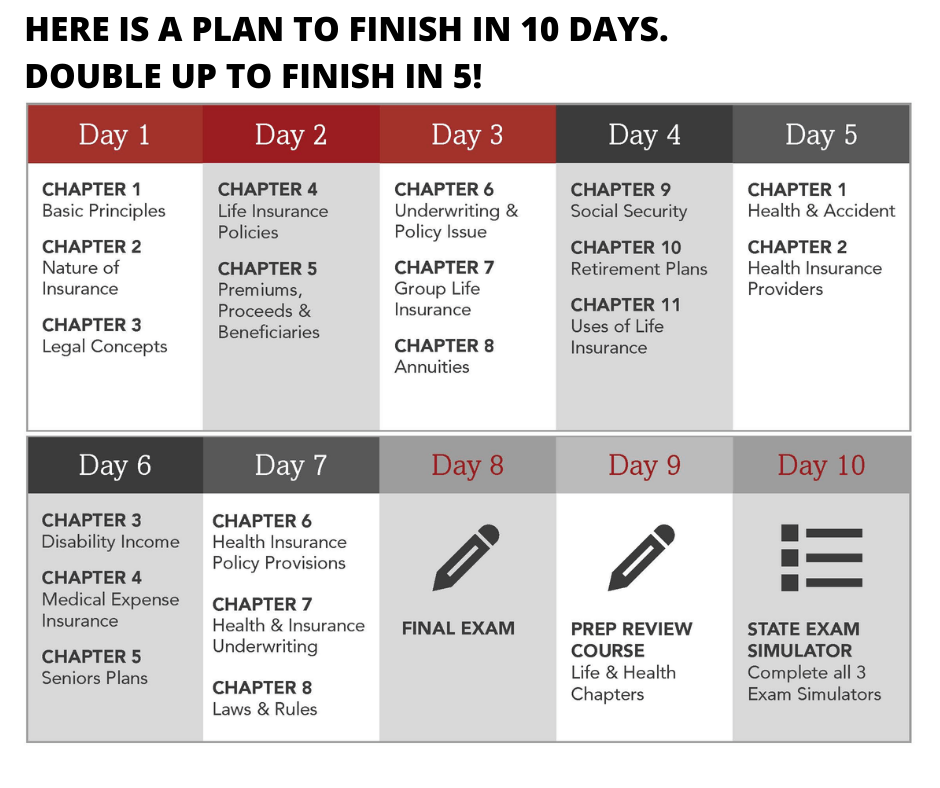
Proven structure to complete your XCEL course in as little as 10 days.